


Line Level Approval Form
Go to Project and Management accounting > projects360 > Expensed line level approval
Go to Expense management > My expenses > Expense line level approval
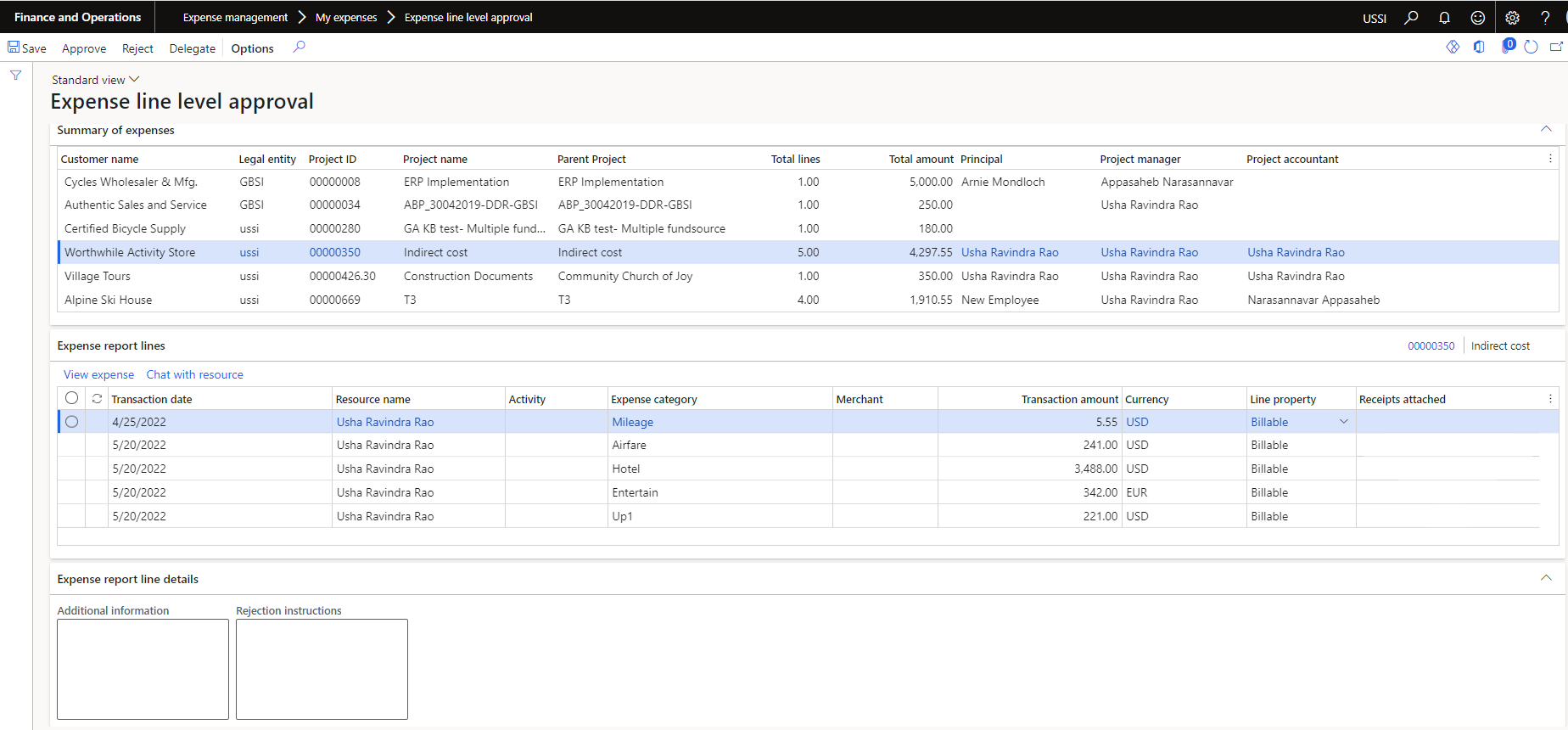
Details of the buttons available are as follows –
| Fields | Description |
| Approve | Expense approver can approve the expense. |
| Reject | Expense approver can reject the expense. |
| Delegate | Expense approver can delegate the expense. |
Details of the fields available on Summary of expenses tab are as follows –
| Fields | Description |
| Customer name | Displays the customer name of the expense. |
| Legal entity | Displays the legal entity of the expense. |
| Project ID | Displays Project Id for which time is submitted. |
| Project name | Displays project name. |
| Parent project | Displays the parent project name of the Project. |
| Total lines | Displays the total lines for approval. |
| Total amount | Displays the total expense amount for approval. |
| Principal | Displays the principal responsible for the project. |
| Project manager | Displays the manager manager responsible for the project. |
| Project accountant | Displays the project accountant responsible for the project. |
Details of the buttons available on Expense report lines tab are as follows –
| Fields | Description |
| View expense | Expense approver can view the expense report details. |
| Chat with resource | Expense approver can chat with resource who has submitted the expense. |
Details of the fields available on Expense report lines tab are as follows –
| Fields | Description |
| Transaction date | Displays the transaction date of the expense. Date can be edited if ‘Date’ parameter under ‘Allow to edit’ is turned on. |
| Resource name | Displays the resource name of the expense. |
| Activity | Displays Activity name. |
| Expense category | Displays the category for which expense is submitted. |
| Merchant | Displays the merchant of the expense. |
| Transaction amount | Displays the transaction amount of the expense. Transaction amount can be edited if ‘Expense amount’ parameter under ‘Allow to edit’ is turned on. |
| Currency | Displays currency. Currency can be edited if ‘Currency’ parameter under ‘Allow to edit’ is turned on. |
| Line property | Displays the line property of the expense. Line property can be edited if ‘Line property’ parameter under ‘Allow to edit’ is turned on. |
| Receipts attached | Indicates if the receipts are attached on the expense. |
Details of the fields available on Timesheet line details tab are as follows –
| Fields | Description |
| Additional information | Displays additional information grom expense line. This field is editable which gets updated on the expense lines. |
| Rejection instructions | Approver can update rejection instructions which gets updated on the expense lines. |
- All the lines that are assigned for approval for the current user is seen in this list page.
- The lines shown are from all the legal entities displaying the total number of lines and total amount of expense.
- Lines are grouped based on the project.