


Parameter Setup
The projects360 expense agent parameters define how expense entries are processed and managed within the system. These settings control receipt itemization (such as meals, transportation, and alcohol), inclusion or exclusion of specific components like tips or alcohol, and enable delegation for creating expenses on behalf of other users. Additionally, telemetry settings provide visibility into expense activities, supporting monitoring and analysis.
Go to Project management and accounting > Setups > projects360 copilot parameters > expense agent
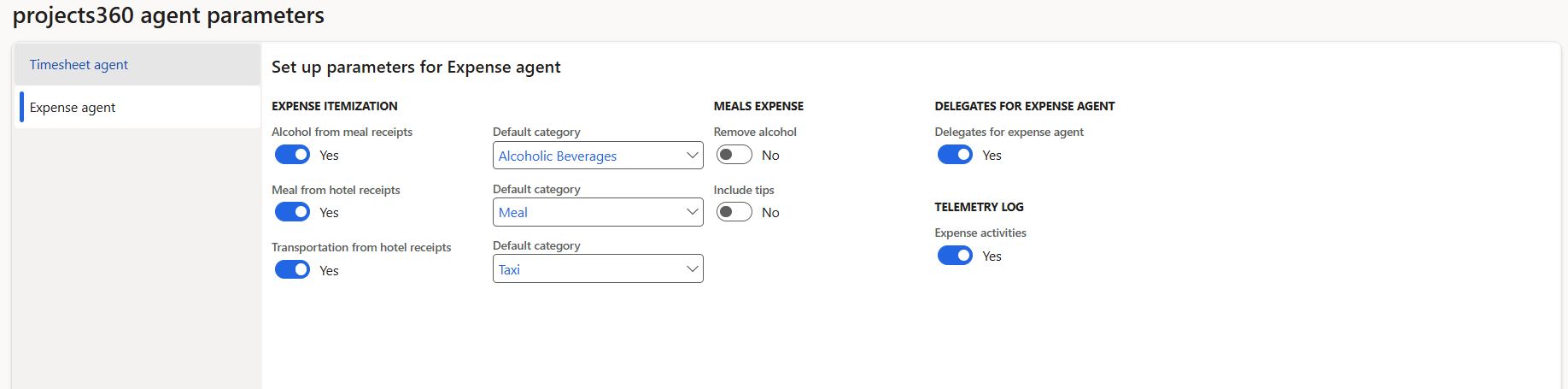
Details of the fields available for Expense agent are as follows –
| Fields | Description |
| Expense itemization | Defines how the agent identifies and separates different components from receipt data and assigns them to relevant expense categories. Itemization must also be enabled in the corresponding expense categories for proper functionality. |
| Alcohol from meal receipts | Detects alcohol-related items within meal receipts and assigns them to a predefined category such as Alcoholic Beverages. |
| Meal from hotel receipts | Extracts meal-related charges from hotel receipts and maps them to a default category such as Meal. |
| Transportation from hotel receipts | Identifies transportation-related costs within hotel receipts (such as taxi charges) and assigns them to a category like Taxi. |
| Remove alcohol | Excludes alcohol-related amounts from the expense entry. These values are not considered in the total and are not displayed in the expense details. |
| Include tips | Adds tip amounts from receipts to the expense entry, ensuring the total amount reflects the complete payable cost. |
| Delegate for expense agent | Allows users to create and submit expenses on behalf of another employee by selecting the relevant user during expense creation. |
| Expense activities | Captures and records activity related to expense processing, providing visibility into created expenses for monitoring and analysis. |